
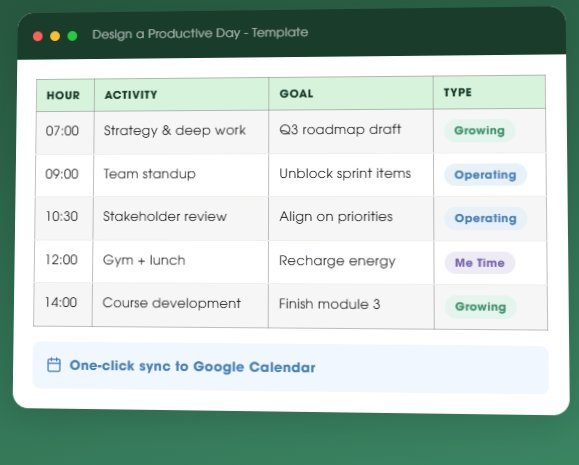
Free Google Sheets template
How to Plan a Productive Day With This Free Template
Map your day in 30-minute blocks, tag every activity, and push the whole thing to Google Calendar with one button. It takes about five minutes.
Get the free template
Enter your details and the Google Sheet opens straight away.
No spam. Unsubscribe anytime.
Why Most People Fail at Planning a Productive Day
Think about the last time you had a genuinely good workday. A day where you closed your laptop and thought, “I actually moved things forward today.” Chances are it did not happen by accident. You knew, before you opened your first app, what your three priorities were. You protected at least one block of uninterrupted time. And somewhere in the middle of it you made space to think.
That is what separates a productive day from a busy one. It comes down to walking into your morning with a blueprint that balances the work that keeps things running (Operating), the work that builds your future (Growing), and the space that keeps you sharp (Me Time).
Most people skip this step. They open the inbox first thing, and from that moment the day belongs to someone else’s priorities. The cause is usually a missing structure to protect, and discipline has little to do with it.
This template gives you that structure. In five minutes the night before, or with your first coffee, you map your day in 30-minute blocks, assign a goal to each one, and tag every activity by type. When you can see that your entire Tuesday is Operating with zero Growing time, you know exactly what to rearrange before the day runs away from you.
What is inside
What You Get in This Productive Day Planner
30-minute time blocks
Plan your day in focused intervals from 7 AM to 6 PM. Each block captures the activity, the goal behind it, and why it matters to your week.
Activity type tagging
Every block is tagged as Operating, Growing, or Me Time. At a glance you see whether your day is all firefighting or whether you are investing in what compounds.
Google Calendar sync
One button push creates calendar events from your plan. No copy-pasting, no manual entry. Your designed day shows up exactly where you need it.
Goal clarity column
For every time slot you write what you expect to get out of it. This small act of intention turns reactive hours into deliberate ones.
Balance visibility
See the ratio of Operating to Growing to Me Time across your day. When 90% goes to Operating, you know exactly what needs to change.
Energy-aware planning
Place your most demanding Growing work during peak energy hours and move routine Operating tasks to low-energy windows, so you work with your rhythm.
Simple process
How to Plan a Productive Day in 4 Steps
1
Get the template
Drop your email above. The Google Sheet opens right away.
2
Make a copy
Open the sheet and go to File then Make a Copy. It is yours to customise however you need.
3
Design your day
Fill in your time blocks, set a goal for each, and tag every activity as Operating, Growing, or Me Time.
4
Sync and execute
Hit the calendar sync button and allow permissions once. Your designed day lands on Google Calendar, ready to follow.
Design your day before the world designs it for you
Send me the template
Free Google Sheet with calendar sync built in.
No spam. Unsubscribe anytime.
Built on a framework
Powered by the 4 Productivity Vectors
This planner rests on a simple idea: real productivity comes from balancing four forces that determine whether your effort turns into results.
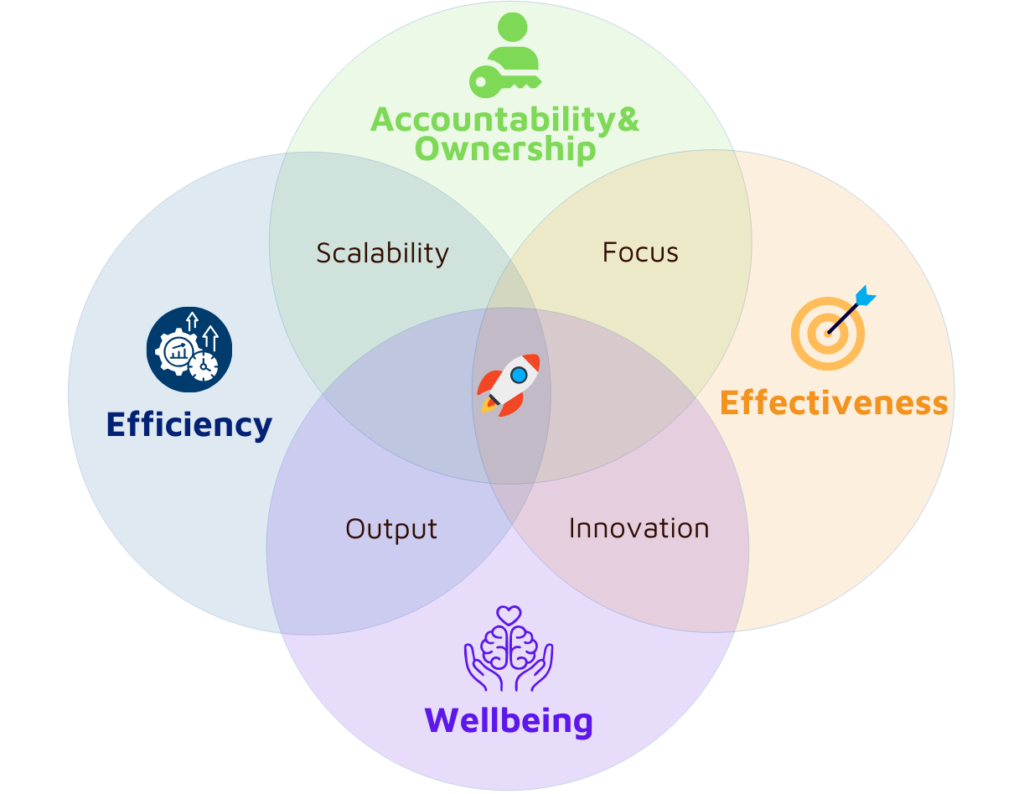
- Efficiency — Are you eliminating wasted time and simplifying how work gets done?
- Effectiveness — Are you working on the right things, the ones that move the needle?
- Ownership — Are you taking charge of your priorities instead of drifting with other people’s agendas?
- Well-being — Are you protecting the energy and health that sustain everything else?
1,000+
Newsletter subscribers
14,000+
Udemy students
4.5 ★
Avg. course rating
Santiago’s frameworks changed how I think about my workweek. I stopped confusing being busy with being productive.Productivi-Tree newsletter reader
Common Questions
Is the template really free?
Yes. Enter your name and email and the Google Sheet opens immediately. There is no payment step and no credit card.
Do I need a Google account?
You need one to make your own copy of the sheet, which is what lets you edit it and use the calendar sync. Viewing works without an account.
How does the calendar sync work?
The sheet includes a script bound to a button. You press it, approve the Google permission prompt once, and it creates a calendar event for every block you planned.
How long does it take to plan a day?
About five minutes once you are used to it. Most people do it the evening before or with their first coffee.
What happens to my email address?
You get the template and occasional productivity notes. You can unsubscribe from any email with one click.
You can keep reacting to whatever lands in your inbox first, or you can spend five minutes deciding what your day is actually for.
Start planning tomorrow
Free template. Calendar sync. Five minutes.
No spam. Unsubscribe anytime.